
Let's talk →
§ CNC machine networking

CNC machines on the network.

USB sticks or a serial cable, one machine at a time. And to know how far along a job was, you had to walk over to the control and look. That's how it was at Officine Di Giacopo SA — here's the problem, and the custom software we built to solve it.

Officine Di Giacopo SA

Precision engineering in Riazzino. Our client well before the shop floor: server, network, telephony and the InfoTime business system. The machines came later — they were the missing piece. digiacopo.ch ↗

Sector
Precision engineering
Location
Riazzino, Ticino
Shop floor
Six machines, from a 1998 control to the 5-axis
Around the machines
hyperMILL CAM, Zoller presetter
§ The problem

Six machines, six different languages.

At Officine Di Giacopo SA, in Riazzino, the shop floor is the one you find in almost every machine shop in Ticino: machines of different makes and generations, bought over twenty years. Two FANUC machining centres generations apart, two Heidenhains — one of them 5-axis — a lathe and a 1990s mill with nothing but a serial port. Every machine spoke its own language, and none of them spoke to the CAM or to the presetter.

  • Every program carried across by hand: USB stick or serial cable, one machine at a time.
  • No traceability: the program corrected at the machine stayed in the machine, and the copy on the server went stale.
  • The risk of loading the wrong version — and overwriting the good one.
  • Tool offsets measured on the Zoller presetter, typed in again by hand on the CNC keyboard.
  • From the office nobody could see whether a machine was in cycle, in alarm or idle: you went and looked.

What we actually connected.

Not a catalogue line-up: what was in the shop, as it was. The oldest control we connected dates from 1998; the newest one runs a 5-axis machine.

ProtocolOn which controlsWhat travels over it
FOCAS · networkFANUC, two generationsPrograms, in-cycle status, alarms, offsets
LSV2 · networkHEIDENHAINKlartext programs, tool inventory, alarms
RS-232 · serialControls with no network portProgram transfer

It works out the two generations by itself, without anyone having to tell it what it is looking at. Around the machines, the hyperMILL CAM — network folder and tool list — and the Zoller presetter, read straight from its database.

A control that isn't on this list? We look at it, we try it, and we tell you where it stands.

§ The solution

One application, on their own server.

A single executable, installed as a service on the production server they already had. No external database, no client to install on the workstations: you open the browser and you work. And the programs never leave the shop.

Part 1

The machines on the network

  • Every machine connected to the workshop network, through the port it already had.
  • Where there was no network port, the connection goes over serial.
  • Programs travel from the server to the control, with no USB sticks and no cable carried by hand.
  • One software layer over three different protocols: the application thinks in “machines”, not in protocols.
Part 2

The custom software

  • The read-back: after every send, the program is read back from the control and compared with the one that went out. What's in the machine is what you sent.
  • The versions: every transfer creates a version with author, date and origin. Two versions compare line by line, and you restore in one click.
  • The return trip: corrections made at the machine come back into the source file on the server — the server copy is the truth again.
  • The presetter: the Zoller measurements land in the CNC tool offsets without being typed in again.
  • Live status and times: axes, spindle, feed, alarms, parts — plus availability reports per machine.
  • The audit log: who did what, when, with what result. Every operation.

What stayed, in figures.

6machines connected, from a 1998 control to a 5-axis machine
3protocol families: FOCAS, LSV2, serial
6weeks from first commit to production

It runs as a single executable on the server they already had: no client to install on the workstations, and no recurring fees.

Everything on one screen.

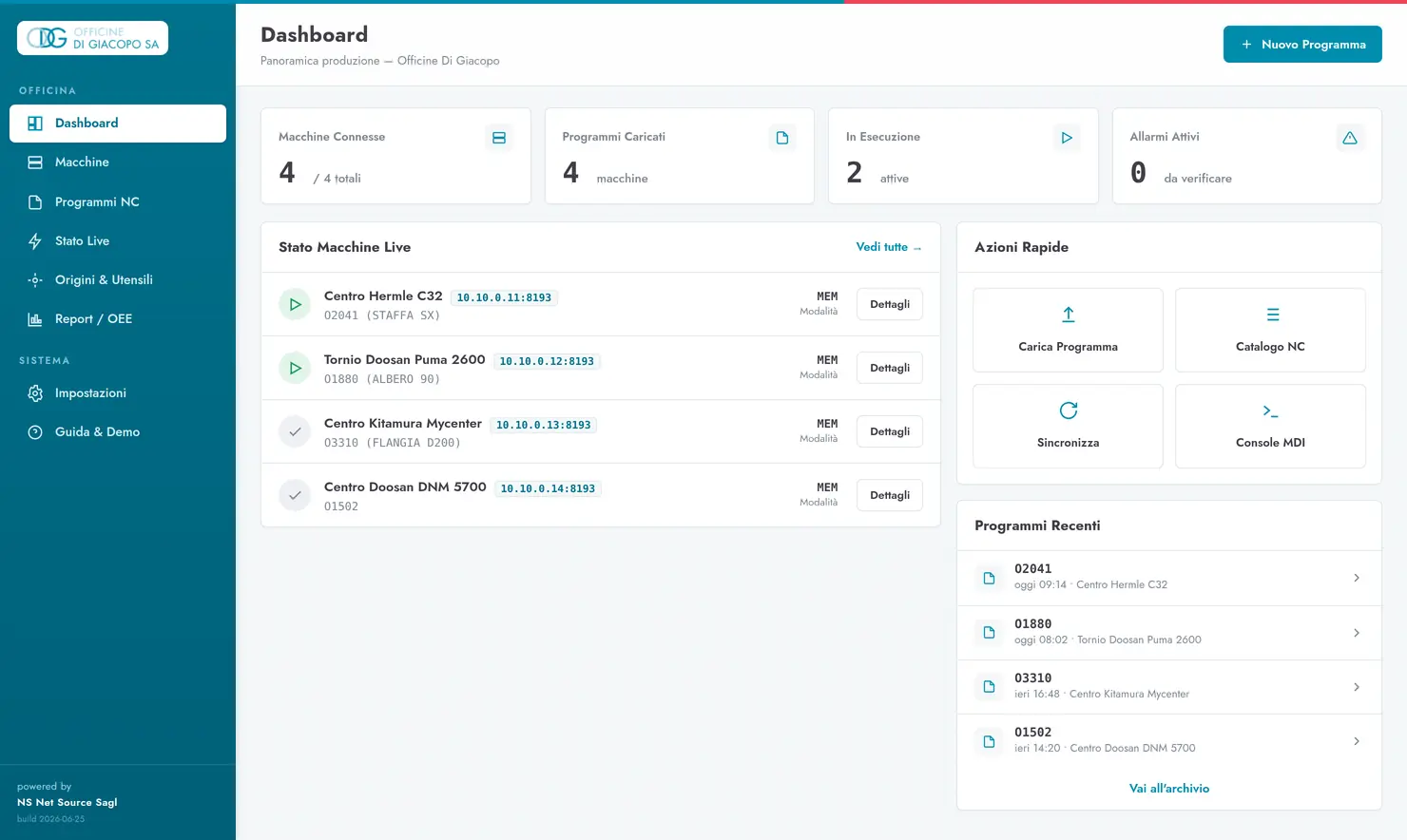
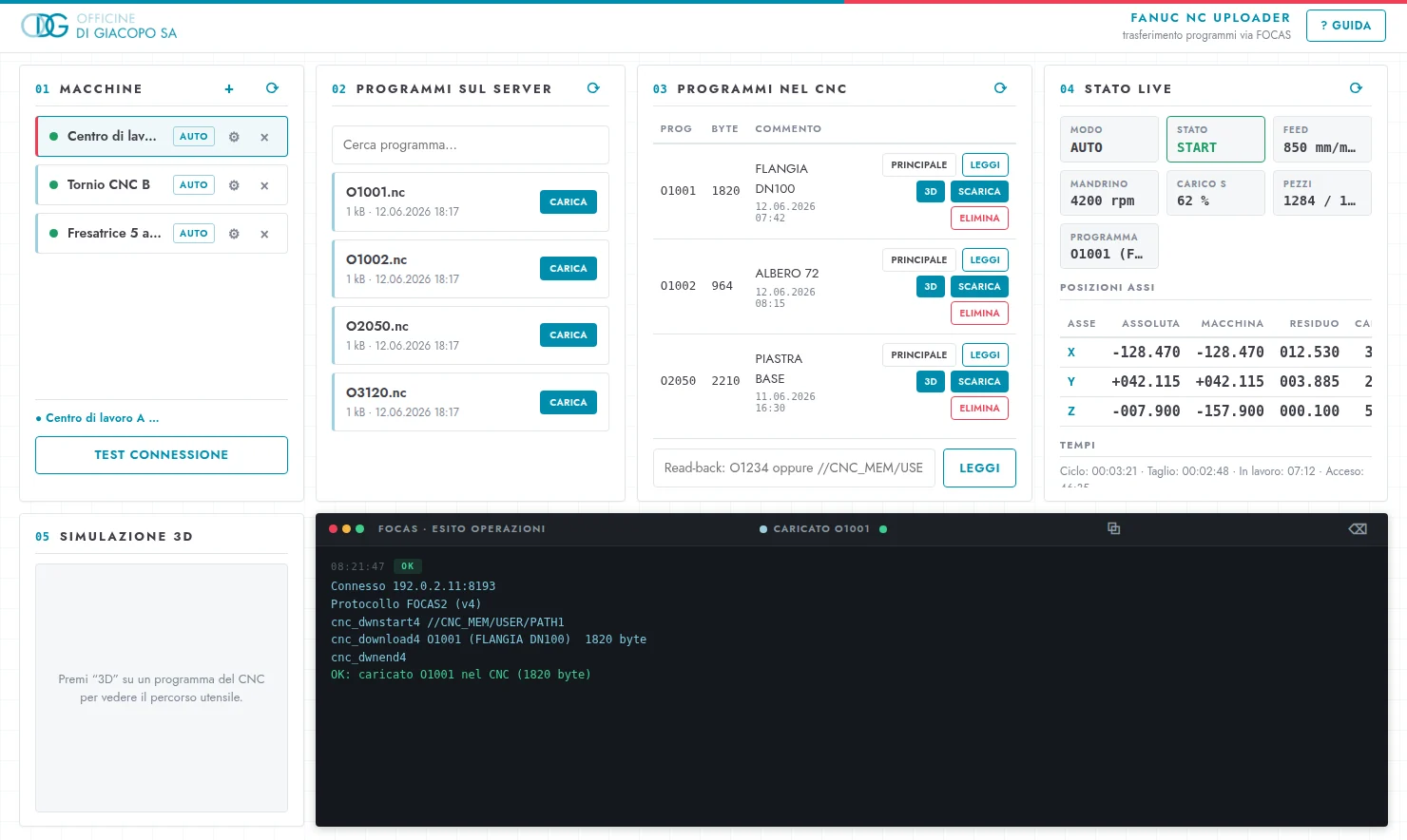
The overview of every machine, the live status of each job (positions, spindle, feed) with the toolpath in 2D and in 3D, and the program archive with its version history.

Live status of a job in the NetSource application: axis positions, spindle speed, feed and load, with the toolpath following the part.
Live status of a job: positions, spindle, feed and the toolpath, here in the 3D view. In use at Officine Di Giacopo SA, Riazzino.
NetSource application dashboard: every machine in the workshop with its status, the running program and recent programs.
The production overview: every machine at a glance, with status, running program and quick actions.

The path views, 2D or 3D, are a visualisation: they show the path, they do not decide for the operator and it is not a safety system.

The value is in what you don't see.

Old and new on the same screen

The same protocol changes from one generation to the next, and the two don't talk to each other. The application handles both and picks on its own: nobody on the floor notices, and the 1998 control sits on the same page as the 5-axis.

We say what the machine actually allows

Not every control lets you write everything: on some, the tool table can be read but not touched. Rather than promise the impossible, the limit is stated plainly and worked around with an operator-side flow.

Even where the network doesn't reach

On machines with no network port the connection goes over serial, and the same interface drives that transfer too. The older machines join the same flow, without replacing electronics that have worked well for thirty years.

§ What changed

USB sticks have gone from the daily flow. Every program has a history you can restore, and corrections made at the machine are no longer lost. Tool offsets go from the presetter to the CNC without being typed in again. From the office you can see the state of the shop floor — and it all runs on the hardware they already had, with no recurring fees.

That software is now called ERGANE.

The program built to measure in Riazzino has become a product for machine shops: it reads the machines you already have — including 1990s controls, including the ones with nothing but a serial port — runs on your own server, and reads every program it sends back from the control, to confirm it arrived identical.

§ Let's get them on the network

Your machines, connected.

Tell us what's on your floor: controls, brands, how many machines. We'll tell you what can be connected and how — no run-around.